Virtual PBX vs Virtual Receptionist: Key Differences in 2026
Telofia team · · 12 min read
Virtual PBX vs virtual receptionist: it comes down to one thing. A virtual PBX routes calls (extensions, menus, queues) but never talks to the caller. A virtual receptionist answers the phone, handles questions, books appointments and takes messages. A business with several departments needs a PBX, a small service business needs a receptionist, and a growing team often needs both.
Contents
- Virtual PBX vs virtual receptionist: what's the difference?
- What does a virtual PBX do?
- What does a virtual receptionist do?
- PBX, AI receptionist or answering service: comparison table
- Which one does your business need?
- When do a PBX and people work better than an AI receptionist?
- When should you combine a PBX with a virtual receptionist?
- How does it work in Telofia, and how can you try it?
- Frequently asked questions
Virtual PBX vs virtual receptionist: what's the difference?
A virtual PBX decides where a call goes, while a virtual receptionist decides what happens during the call. The first is a switchboard, the second is someone to talk to.
A PBX assumes there's a person waiting at the other end. If everyone is busy, the caller hears hold music, a ringing tone or voicemail.
A receptionist (a person from a call answering service or an AI phone assistant) deals with the call directly: answers the question, books the appointment, logs the request and only transfers to a team member when it's genuinely needed.
What does a virtual PBX do?
A virtual PBX (also called a hosted or cloud phone system) runs your business number in the cloud and distributes calls between staff and departments. It works without any physical hardware in the office.
Typical PBX features include:
- Extensions — every team member has a short internal number and can transfer calls to colleagues.
- Phone menu (IVR) — “press 1 for service, 2 for accounts”.
- Queues and ring groups — the call waits, or rings several people at once, until someone answers.
- Opening hours and rules — one routing during the day, another after closing time.
- Call recording and statistics — who spent how long on the phone, how many calls waited in the queue.
The limits of a PBX are simple: it won't answer a question about prices, book an appointment or log a fault report. If nobody picks up, the call ends in voicemail or is lost.
What does a virtual receptionist do?
A virtual receptionist is a service that answers calls on behalf of your business and talks to your customers. It can be a call answering service staffed by people, working during the provider's hours, or an AI phone assistant available 24/7.
A good virtual receptionist:
- Answers questions — opening hours, services offered, directions, how pricing roughly works.
- Books appointments in your calendar and confirms them by text.
- Takes messages and callback requests with the details you need (address, description of the fault, appliance model).
- Transfers urgent calls to the right person and, if they don't answer, takes a message.
A real-world example: at one of the businesses working with Telofia — a service salon — the assistant books appointments and meetings in the calendar, confirms them by text, transfers callers to a team member when needed and takes callback requests. It handles several dozen phone calls a month, and roughly one in three ends with a booked appointment or meeting.
If you're weighing people against AI, read our guide to a virtual receptionist for law firms.
PBX, AI receptionist or answering service: comparison table
A PBX wins at distributing calls between people, an AI receptionist at answering when nobody has a free hand, and a staffed answering service where the conversation needs a human, but only during its working hours.
| Feature | Virtual PBX | AI receptionist | Call answering service (people) |
|---|---|---|---|
| Main job | Routing calls | Handling the conversation | Handling the conversation |
| Who talks to the caller | Your team member | The assistant, a team member if needed | The provider's agent, a team member if needed |
| Answers questions | No, only recorded messages | Yes, based on knowledge about your business | Yes, following your instructions |
| Books appointments | No | Yes, in your calendar | Depends on the provider |
| When nobody answers | Queue, voicemail or ringing tone | Conversation, message, callback request | The agent takes a message |
| Hours of cover | According to your rules | 24/7 | The provider's working hours |
| Several calls at once | As many as there are free staff | Up to the service's limit of simultaneous calls | As many as there are agents on shift |
| Cost model | Usually a subscription per user or extension | Usually a subscription with bundled minutes or a per-minute fee | Usually a fee per call, per minute or a subscription |
| Setup | Extensions, IVR, queues, apps for staff | Business knowledge, calendar, call forwarding | Instructions for agents, call forwarding |
| What it needs from you | People ready to answer | Up-to-date knowledge and calendar | Up-to-date instructions and access to your diary |
| Best for | Businesses with departments and many staff | Small service businesses and tradespeople | Businesses where the call needs a human |
In short: a PBX organises call traffic when you have people to assign it to. A receptionist takes over answering when you're short of people or they're busy with customers.
Prices for PBX systems, answering services and AI receptionists vary between providers, so instead of price ranges we describe the billing models. Compare the price lists of the providers you're considering and work them out for your number of staff or calls — our article how much a virtual receptionist costs per month will help.
Setup time also depends on scope: a PBX with several departments needs the menu, queues and extensions planned, while a receptionist needs your business knowledge and call transfer rules prepared.
Which one does your business need?
The choice depends on how many people actually answer the phone and what callers want.
- Sole traders and tradespeople (plumbers, electricians, heating and air-conditioning engineers) — a receptionist. A PBX has nowhere to route calls when the only person is up a ladder.
- A practice, salon or garage with a few staff — a receptionist that transfers urgent calls. Most calls are about appointments and simple questions.
- A business with departments (sales, service, accounts) and staff permanently on the phones — a PBX, with an AI receptionist as the first line or for out-of-hours cover.
- A customer service team with queues — a PBX as the foundation, with an AI assistant taking calls that wait too long.
Example — assumptions: an air-conditioning service firm, 2 engineers out on jobs, 30 calls a week, 10 of which come in during an installation; a month counts as 4 weeks. A PBX with a ring group will pass these calls to the same busy people, so they end up in voicemail.
A further assumption: 6 in 10 callers don't leave a message. Result: of 40 such calls a month, 24 enquiries are lost and only 16 voicemails come back to you.
With a receptionist — assumption: 9 in 10 callers talk to the assistant, the rest hang up. Result: 36 enquiries a month logged as a job, an appointment or a callback request instead of 16, and the engineer only calls back where necessary.
Before you choose, check:
- Who answers today? — if nobody has a free hand, a PBX on its own won't change anything.
- What happens to a missed call? — voicemail is often the end of the contact; a logged message is a chance of a job.
- Which questions keep coming up? — the more repetitive questions and bookings, the more a receptionist delivers.
- Do you need extensions? — if staff often transfer calls between themselves, a PBX makes sense.
- How long is your menu? — a long “press 1, 2, 3” puts callers off; simply talking is quicker.
When do a PBX and people work better than an AI receptionist?
A PBX with people on the phones is better where the call needs experience, empathy or a decision that can't be written down as rules.
- Difficult and emotional calls — complaints, upset customers, personal matters where a human touch counts.
- Negotiations — discounts, contract terms and bespoke quotes need a decision from the owner or a salesperson.
- Callers who don't want to talk to AI — some customers ask for a person straight away; you need someone to transfer them to, or a quick callback.
- Lengthy technical troubleshooting — working out the cause of a fault step by step over many minutes is better handled by an engineer.
An AI receptionist can also misunderstand a caller, for example with background noise, an unusual name or a vague question. Its answers are only as good as the knowledge you give it: if your prices or policies aren't in the knowledge base, the assistant won't answer them accurately.
When should you combine a PBX with a virtual receptionist?
Combining them makes sense when you have a team on the phones, but they're not always available: at peak times, during breaks or after hours. The PBX keeps distributing calls, and the AI receptionist picks up the ones nobody answers.
The most common setups are:
- AI as the first line — the assistant answers every call, deals with simple matters and transfers the rest to the right department.
- AI as backup — the PBX rings the team, and after a few unanswered rings the call goes to the assistant.
- AI after hours — people answer during the day, the assistant in the evenings and at weekends.
This is the typical path of a call in a combined setup:
- Customer calls the business number
- The PBX routes the call
- The AI receptionist answers
- Conversation, booking or message
- Urgent matter goes to a team member
How does it work in Telofia, and how can you try it?
Telofia is an AI phone assistant that answers your calls and works like a virtual receptionist: it answers 24/7, books appointments in Google Calendar, takes messages and transfers urgent calls according to your rules. At the start of every call it says that it's an AI.
If you already have a PBX, you don't need to give it up. On the screen for connecting your own number, you choose either a SIP connection to your PBX or forwarding calls from your current number to your Telofia number.
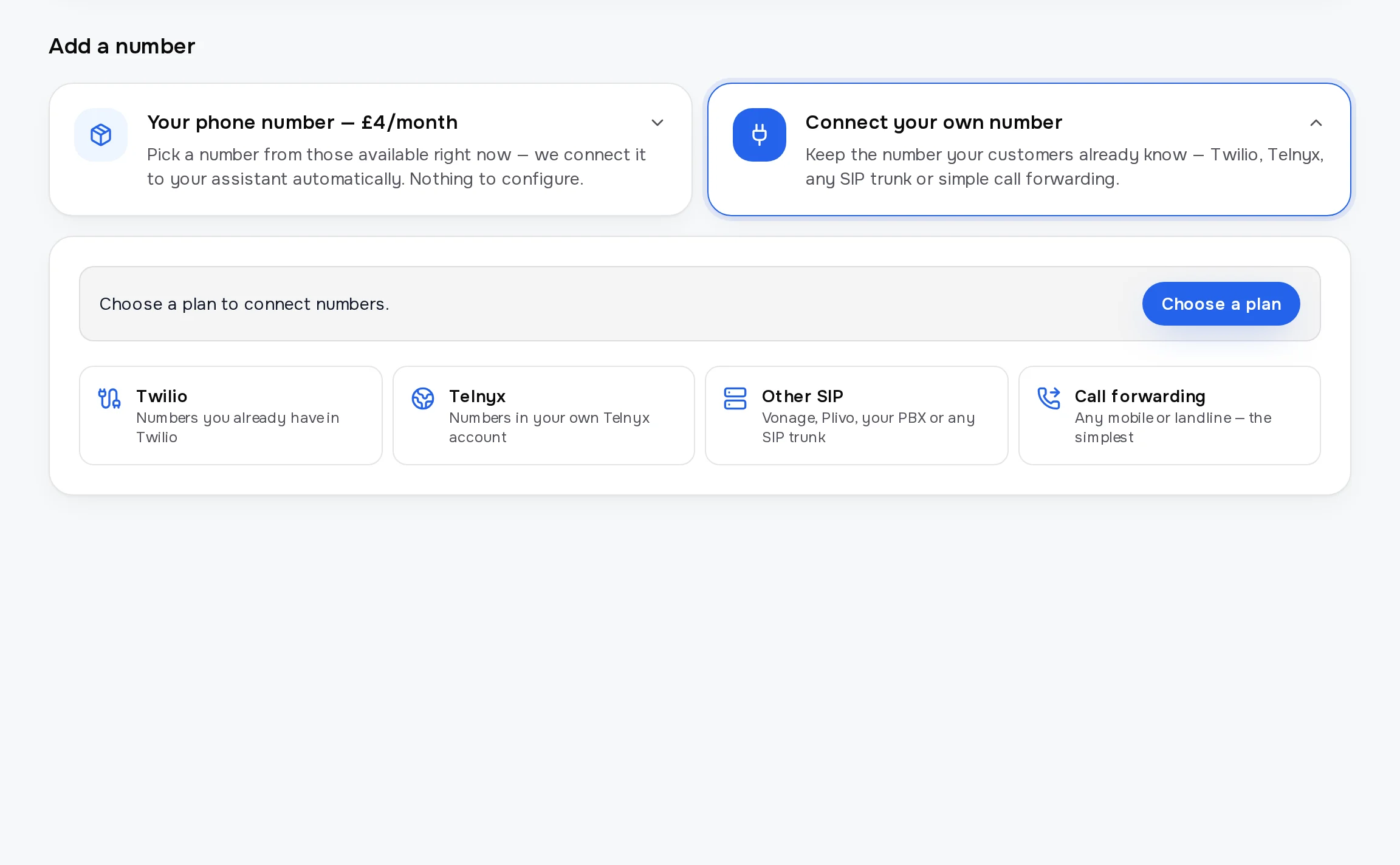
We describe the setup step by step, including transfer rules and connecting your number, on the how Telofia works page.
The quickest way to find out whether you need a receptionist, a PBX or both is to hear the assistant handle a call about your business. Paste your website address and the assistant learns its answers from it.
Create an account and try it for 14 days with 30 free minutes, in your browser and with no card needed. Telofia costs from £35 a month excl. VAT on yearly billing — details on the pricing page.
Frequently asked questions
Will a virtual receptionist replace a virtual PBX?
In a small business, usually yes, because the receptionist answers calls and transfers urgent ones to the right person itself. In a business with departments and extensions, it's better to keep the PBX and add a receptionist as the first line or for out-of-hours cover.
Can a virtual PBX book appointments?
A PBX on its own doesn't hold a conversation, so it can't book an appointment or answer a question. It routes the call to a team member who does that manually. Booking by phone without a person involved is what a virtual receptionist provides, for example an AI assistant connected to your calendar.
Can an AI receptionist handle every call?
No. Complaints, negotiations, lengthy technical troubleshooting and calls from people who don't want to talk to AI are better left to people. The assistant can also misunderstand a caller, and its answers depend on the knowledge you give it.
Can an AI receptionist transfer a call to a team member?
Yes. You set the rules, for example an urgent fault or a customer ready to order, and the assistant puts the caller through live to the chosen person; if nobody answers, it takes a message that you see in your dashboard. Transfers work once you choose a plan; during the trial the assistant takes a message.
Do I need to change my business number to add a virtual receptionist?
No. Your current number stays, and you forward calls to your Telofia number, for example only when you don't answer or you're busy; you get a Telofia number with a paid plan (it's included in every plan). If you use a PBX, from the Office plan you can also connect it to the assistant via SIP.
Does the caller know they're talking to an AI?
Yes. The Telofia assistant says it's an artificial intelligence at the start of every call. The caller can carry on with their request or ask to speak to a person — the assistant transfers the call if you've set up a transfer rule (once you choose a plan) or takes a callback request.
Try Telofia on your own calls
Set up your AI receptionist in about five minutes: 14-day trial with 30 free minutes, no card needed for the browser test.
Prefer to hear it first?
Enter your number and the assistant calls you within seconds, acting as the receptionist of your business.
Also available in: Polski, Deutsch, Español, Français, Italiano, Português, Nederlands