Taking Orders Over the Phone Without Mistakes: Guide and Checklist
Telofia team · · 11 min read
Taking orders over the phone without mistakes comes down to three habits: always note six details (items, quantities, options, collection or delivery time, name and contact number), read the order back with the total and payment method before you hang up, and ask for prepayment on large or custom orders. An SMS payment link handles that during the call.
Contents
- What should you write down when taking orders over the phone?
- How do you confirm the order so nothing goes wrong?
- How do you organise phone answering at peak times?
- When should you ask for prepayment, and how does an SMS payment link work?
- Checklist for taking orders over the phone (copy and use)
- How does an AI receptionist take the order for you?
- Try taking orders with Telofia
- Frequently asked questions
What should you write down when taking orders over the phone?
A phone order is only complete when anyone on your team can prepare it without calling the customer back. To get there, always record the same fields in the same order.
- Items — the exact product name as it appears on your menu or catalogue, not the customer's description (“that big chocolate cake”).
- Quantities — number and unit: 2 pizzas, 1 kg of bread, 12 roses, 3 boxes.
- Options and variations — size, flavour, how the meat is cooked, gluten-free, flower colour, wording on the card or cake.
- Collection or delivery — the agreed day and time; for delivery, the full address, floor and a landmark.
- Name — at least first name and surname, so the order can be found at the counter.
- Contact number — confirmed out loud, digit by digit, because it's your only way back if something is missing.
In a florist's, add the recipient's name, the card message and the delivery window. In a restaurant, ask about allergies. In a café or bakery, the exact collection time is usually the most important detail.
How do you confirm the order so nothing goes wrong?
Reading the order back, item by item, before you hang up is the simplest way to catch a mistake while it still costs nothing. The customer hears what you've written down and corrects it on the spot.
Always use the same order: items with quantities and options, then time and collection or delivery, then total and payment method, then name and number. Finish with a closed question that needs a “yes”.
Café or bakery example, for collection:
- Reading the order back — “So that's two butter croissants, one sliced wholemeal loaf and two white coffees to take away. Is that right?”
- Time and method — “That's for collection in store at quarter past eight, yes?”
- Total and payment — “That comes to [order total], and you'll pay at the counter when you collect. Is that OK?”
- Contact — “The order's under your name and the number ends in 4-5-6, correct?”
Florist example, with delivery:
- Reading the order back — “So that's a bouquet of 12 red roses, medium size, with a card. Is that right?”
- Recipient and card — “It's being delivered to [recipient's full name], and the card says: ‘Happy birthday, with love’. Is that right?”
- Address and delivery window — “The address is [street, number, floor], tomorrow between 10am and 1pm, correct?”
- Total and payment — “The total is [order total] including delivery, and it's paid in advance through the link I'm texting you now. Is that OK?”
- Contact — “And your number, as the person ordering, ends in 7-8-9, right?”
Read the card message word for word and spell out unusual names. If the customer changes something during the read-back, repeat only the changed line and the new total; reading the whole order again is tiring and adds no extra safety.
How do you organise phone answering at peak times?
At peak times, the goal is that no call goes unanswered and nobody takes orders from memory. That needs a routine set up before things get busy.
The rush depends on the business: in a bakery or café it's usually early morning; in a florist's or gift shop, the days before special occasions; in a restaurant, lunch and dinner. Plan your routine for those moments.
- One person on the phone — even in 30-minute shifts; whoever is on the till, at the workbench or in the kitchen shouldn't answer at the same time.
- One place to write orders — a numbered pad, a form or an ordering system, never loose scraps of paper.
- Realistic times — give collection times or delivery windows with a buffer and keep a note of the current waiting time.
- Sold-out items on display — a board next to the phone showing what has run out (a cake flavour, a flower colour, a size) stops you promising what you don't have.
- Voicemail with a useful message — if you can't answer, the greeting should give your hours, another way to order and a promise to call back.
Voicemail is the weakest option for orders: someone calling to order can simply hang up and ring somewhere else. A virtual receptionist or an automated answering service that actually takes the order handles the rush better than a recording.
When should you ask for prepayment, and how does an SMS payment link work?
Ask for prepayment, in full or as a deposit, whenever the order is made to measure or can't be resold: personalised cakes, flower arrangements, group menus, special-occasion orders or large amounts.
For small, routine orders, such as a coffee and two savoury bakes to collect in 10 minutes, prepayment usually creates more friction than protection.
| Business and order type | Prepayment? | Practical suggestion |
|---|---|---|
| Café — order to collect in minutes | No | Pay at the counter |
| Bakery — everyday order | No | Pay on collection |
| Bakery — large order for an event | Yes, deposit | Part deposit when ordering |
| Cake shop — personalised cake | Yes | Half as a deposit or the full amount |
| Florist — arrangement with delivery | Yes | Full amount before delivery |
| Restaurant — group menu | Yes, deposit | Deposit per person or a fixed amount |
The rule behind the table: the more an order is made to measure and the less it can be resold, the more sense it makes to charge up front. Set the deposit to suit your margin and your history of no-shows.
Example — assumptions: a cake shop takes 8 personalised cake orders a week and 1 order a month is never collected, which makes 12 cakes a year. To keep it simple, count as a loss the amount you don't receive for a cake that has already been made.
| Example (12 uncollected cakes a year) | No deposit | Half-price deposit | Full payment |
|---|---|---|---|
| Received when ordered, per cake | Nothing | Half the price | Full price |
| Loss per uncollected cake | Full price | Half the price | Nothing |
| Loss over the year | Value of 12 cakes | Value of 6 cakes | Nothing |
| Friction for the customer | None | Low | Higher |
In this example, a half-price deposit cuts the annual loss in half and full payment removes it. Run the numbers again with your average cake price and your own number of no-shows.
An SMS payment link works like this: during or right after the call, the customer gets a text with a secure link, opens it on their phone and pays by card on a payment page. You can see whether the payment has gone through before you start preparing the order.
Tell the customer the exact amount before sending the link and check they've received the text while you're still on the call. That way you avoid forgotten links and orders left hanging.
Checklist for taking orders over the phone (copy and use)
Print this list and keep it next to the phone. An order is only closed when every point is ticked.
- Items using the menu or catalogue name — avoids mix-ups between similar products; ask “which one?” if in doubt.
- Quantity of each item — always write the number before the product name.
- Options and restrictions — size, flavour, colour, allergies, wording on the card or cake.
- Collection or delivery, day and time — for delivery, the full address, a landmark, the delivery window and the recipient's name.
- Name and contact number — number repeated back digit by digit.
- Agreed substitutions — if something was sold out, note the alternative the customer accepted.
- Total given to the customer — avoids surprises at the counter or on delivery.
- Payment method — at the counter, on delivery or in advance by link; if there's a deposit or full payment, note whether it's been paid.
- Order read back and confirmed — only after a clear “yes” from the customer.
- Order passed to the team — to the kitchen, the workbench, the counter or the delivery list, with the time clearly visible.
How does an AI receptionist take the order for you?
An AI receptionist answers the call, asks for the items with quantities and options, the name and the collection or delivery details, reads the order back and saves it only once the customer confirms. Any other details you want to collect can be added in Caller details.
In Telofia, every confirmed order becomes a task for your team in the dashboard, with an email summary and a transcript in Calls.
At the start of every call, the assistant says it's an AI (see the AI disclosure). It speaks 8 languages, including English and Portuguese, and switches language automatically, which helps when tourists call.
For orders that need prepayment, the assistant texts a secure payment link during the call for the agreed amount (at most two links per call) and can check whether it has been paid. The money goes to your own Stripe account, connected via Stripe Connect; this feature is available from the Office plan.
The essential setup for orders takes just a few steps:
- In Caller details, use Add item to ask for, say, the delivery address or collection time (up to 8 items, required or optional).
- In the Notices & closed days menu (that's the exact name in the dashboard), add notices such as the deadline for special-occasion orders, so the assistant mentions them.
- In Assistant, on the Call transfers card, create a rule to transfer large orders or complaints to a person; during the free trial transfers are turned off and the assistant takes a message.
- In SMS, on the Automations tab, turn on Payment link once you've connected your Stripe account.
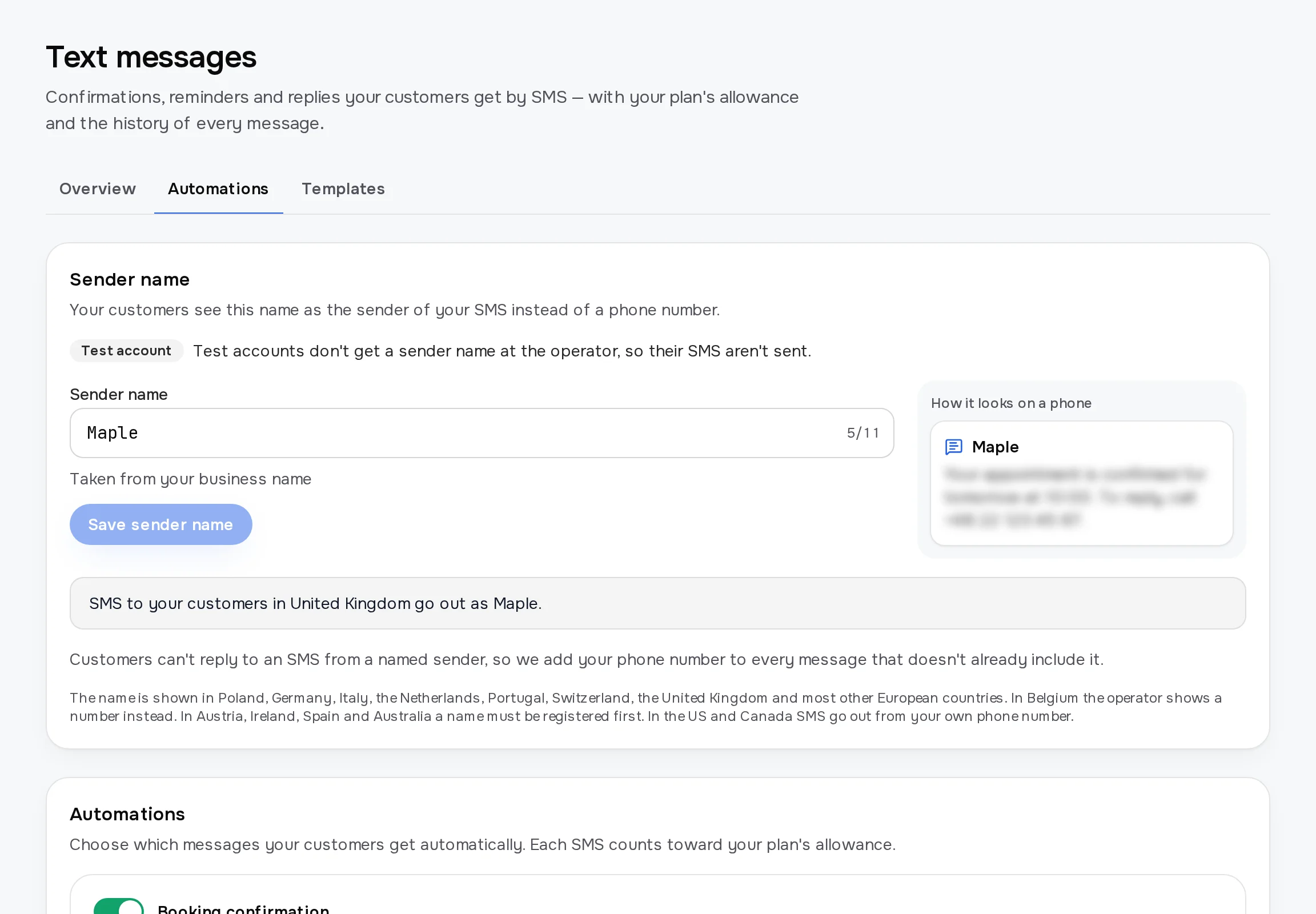
See how the rest works in how it works and the details for your sector in virtual receptionist for restaurants, cafés and shops. If you also book tables or services, read automated phone appointment booking: what a good call must do.
Try taking orders with Telofia
If the phone rings when your team is busy, test whether an AI assistant can take your orders the way you would.
Create your account and try it free for 14 days with 30 minutes included: paste your website address and try the assistant in your browser in about five minutes. Start your free trial.
After the trial, plans start at £35 a month on yearly billing, excl. VAT; see the details on pricing.
Frequently asked questions
What's the best way to write down phone orders?
Always use the same form with six fields: items, quantities, options, collection or delivery with a time, name and contact number. Read the order back with the total and payment method before you hang up, and only pass it to the team once the customer confirms.
Should I ask for prepayment on phone orders?
It's worth it for personalised, high-value orders or ones that can't be resold, such as made-to-order cakes, flower arrangements or group menus. For small, routine orders, like a breakfast to collect, paying at the counter is usually enough.
How do I send a customer a payment link by SMS?
Agree the amount during the call and send a text with a secure payment link, where the customer pays by card on their phone. Check while you're still on the line that the message has arrived, and confirm the payment before preparing the order.
What should I do if an item runs out mid-order?
Tell the customer straight away and offer one or two similar alternatives, with the price. Note the substitution as a separate line and read back that line and the new total before you end the call.
Can an AI take phone orders for a bakery, florist or restaurant?
Yes. An AI phone assistant asks for the items with quantities and options, the name and the collection or delivery details, reads the order back and saves it once the customer confirms. Unusual orders can be transferred to a member of your team.
What should I do when I can't answer the phone at peak times?
Put one person in charge of the phone in shifts and record a voicemail greeting with your hours and alternatives. To avoid losing orders, an automated answering service that takes the full order works better than a recording.
Try Telofia on your own calls
Set up your AI receptionist in about five minutes: 14-day trial with 30 free minutes, no card needed for the browser test.
Prefer to hear it first?
Enter your number and the assistant calls you within seconds, acting as the receptionist of your business.
Also available in: Polski, Deutsch, Español, Français, Italiano, Português, Nederlands