Automated Phone Appointment Booking: What a Good Call Must Do
Telofia team · · 13 min read
Automated phone appointment booking means an AI receptionist answers the call, finds the right service, checks your real calendar, offers two or three free times, reads the details back and books only once the caller says yes. Then, if SMS automations are switched on, it sends an SMS confirmation and a reminder before the appointment. It works 24/7.
Can appointments really be booked by phone when nobody picks up?
Yes. Phone bookings can happen with nobody picking up, but only if whatever answers the call can see your diary and write to it. A system that only records a message leaves you with a callback list, not a booking.
There are four common ways to handle booking calls you can't answer: a voicemail greeting that points to an online booking link, a call answering service that takes messages, an in-house or virtual receptionist, and an AI receptionist connected to your calendar.
Voicemail sends the caller somewhere else, and a message-taking answering service creates work for later. A receptionist can book on the call, but only during staffed hours. Unlike a staffed receptionist, an AI receptionist connected to your calendar can book on the call at any hour, at 11pm on a Sunday as easily as at 10am on a Tuesday.
An AI receptionist is software that answers your business line in a natural voice, understands what the caller wants and acts on it, for example by booking, moving or cancelling an appointment.
What automated phone appointment booking must do on every call
A good booking call does eight things, in roughly this order. If any of them is missing, you get double bookings, no-shows or angry callers.
- Find the service — it works out what the caller actually needs (a cut and colour, a check-up, an MOT) so it knows how long the slot must be.
- Check the real calendar — it checks your real calendar during the call.
- Offer two or three concrete free times — "Thursday at 10:30am or Friday at 2pm" is easier to answer than "when suits you?". If the caller names an exact time, it checks that exact time.
- Read the details back — service, day, time, name and phone number, so a mistake is caught before it lands in the diary.
- Book only after a clear yes — nothing is written to the calendar until the caller confirms.
- Confirm by SMS and remind before the visit — the confirmation text is the caller's proof of booking; the reminder gives them a nudge shortly before the appointment.
- Let callers move or cancel by phone — an existing booking can be changed to another free time, or cancelled after an explicit yes, and the slot frees up straight away.
- Respect closed days — on bank holidays or while you're away, it books nothing and tells the caller when you're open again.
What does a booking call sound like? Three example calls
The calls below are invented examples to show the flow. They are not real customers or real calls.
Example — a hair salon with three stylists, 9pm on a Wednesday. The caller wants a cut and blow-dry with a particular stylist. The assistant checks only that stylist's diary, offers Saturday at 11am or Saturday at 2:30pm, reads back "cut and blow-dry with your chosen stylist, Saturday at 11am, under the name you gave" and books after the caller says yes. A confirmation text follows (if Booking confirmation is switched on under SMS → Automations).
Sample dialogue — a generic hair salon example, not a real call (it picks up after the short AI greeting):
- Caller: Hi, I'd like a cut and blow-dry this Saturday, please.
- Assistant: I can do Saturday at 11am or Saturday at 2:30pm. Which suits you better?
- Caller: 11am, please.
- Assistant: Lovely. Can I take your name and the best mobile number for you?
- Caller: (gives their name and mobile number)
- Assistant: So that's a cut and blow-dry on Saturday at 11am, under the name and mobile number you've just given me. Shall I book that for you?
- Caller: Yes, go ahead.
- Assistant: That's booked. You'll get a text confirming it shortly.
If that stylist is fully booked, the assistant offers a colleague who does the same service or another date, rather than saying no.
Example — a dental practice, 7:45am before reception opens. A patient calls to move next Tuesday's check-up. The assistant finds the existing appointment, offers two free times later that week, moves it after the patient agrees and updates the calendar at once. A second caller mentions a swollen jaw and severe pain; that call is not something to book into the next free check-up slot, so it is put through live to a person via a transfer rule, or the assistant takes a message if nobody answers.
Example — a car workshop on a Monday morning with every mechanic under a car. A caller wants a service for a family estate. If you've added make, model and registration under Caller details, the assistant asks for them, and the team sees them on the call page and in the call summary email. It then checks the workshop diary, offers Wednesday 8:30am drop-off or Thursday 8:30am, reads it all back and books.
Which option actually fills your diary, and which just takes messages?
| Option | Books into your diary? | Out of hours | Best for |
|---|---|---|---|
| Voicemail with booking link | No — caller must book online | Yes, but caller must act later | Very low call volume |
| Call answering service | Often messages only — check the contract | Varies by provider — check the contract | Businesses wanting a human voice |
| In-house receptionist | Yes | No, only staffed hours | Busy practices with steady footfall |
| Virtual receptionist (remote person) | Sometimes, if given diary access | Varies by provider — check the contract | Complex, high-value calls |
| AI receptionist with calendar | Yes, on the call | 24/7 | Small teams busy with clients |
If your goal is a fuller diary rather than a longer callback list, the option has to write to your calendar during the call. For a closer look at what human answering costs, see telephone answering service cost in the UK.
What do you need to prepare before switching on phone booking?
You need four things ready: a service list with durations, your buffers, one calendar that is kept up to date, and your closed days. Getting these right matters more than any setting.
- Service list with durations — write each service the way callers say it ("gents' cut", "scale and polish", "full service") with a realistic time. A 30-minute slot for a 45-minute job causes overruns all day.
- Buffers — clean-down between patients, colour processing time, a car on the ramp longer than planned. The simplest way to make sure a buffer is respected is to include it in the service duration you enter.
- One live calendar — if staff also book walk-ins or phone bookings by hand, they must go into the same calendar, or the assistant will offer times that are already gone.
- Who does what — which stylist, dentist or mechanic handles which services, and their days off.
- Closed days and changed hours — bank holidays, training days and your summer break, entered before they arrive.
- Details to collect — anything you need beyond name and number, such as vehicle registration or whether the patient is new.
Worked example — assumptions: a salon with three stylists; the durations below are illustrative, so replace them with your own timings. For each service, note what callers say, the hands-on time, the buffer, the total you enter and who does it.
- Cut and colour — callers say "cut and colour" or "roots and a cut"; 90 min + 15 min processing = 105 min; senior stylists only.
- Cut and blow-dry — callers say "cut and blow-dry" or "restyle"; 45 min + 10 min clean-down = 55 min; all three stylists.
- Gents' cut — callers say "men's cut" or "short back and sides"; 25 min + 5 min clean-down = 30 min; all three stylists.
- Blow-dry only — callers say "blow-dry" or "wash and blow"; 30 min + 5 min clean-down = 35 min; all three stylists.
How a wrong duration ripples — same assumptions, but cut and colour is entered as 90 min instead of 105. One stylist gets colours booked at 9am, 10:30am and 12pm, then a gents' cut at 1:30pm. In reality the first colour finishes at 10:45am, the second at 12:30pm and the third at 2:15pm, so the 1:30pm client waits 45 minutes and the lunch break disappears.
Check each duration against a real day in your diary before you enter it. Fifteen missing minutes per booking adds up faster than you think.
How does booking by phone work in Telofia?
In Telofia, the assistant books into Google Calendar or, if no calendar is connected, into the built-in calendar under Appointments. Setup takes a few minutes:
- In Integrations, under Calendars, click Connect on Google Calendar and pick the Calendar for bookings.
- In Assistant, open the Appointments card and use Add service to enter each service with its duration.
- Optional: in Team, use Add a person to give each stylist, dentist or mechanic their own calendar and the services they do.
- In Notices & closed days, use Add closed days for holidays.
- In SMS, open the Automations tab, switch on Booking confirmation and Appointment reminder (24 hours before by default, adjustable), then click Save settings.
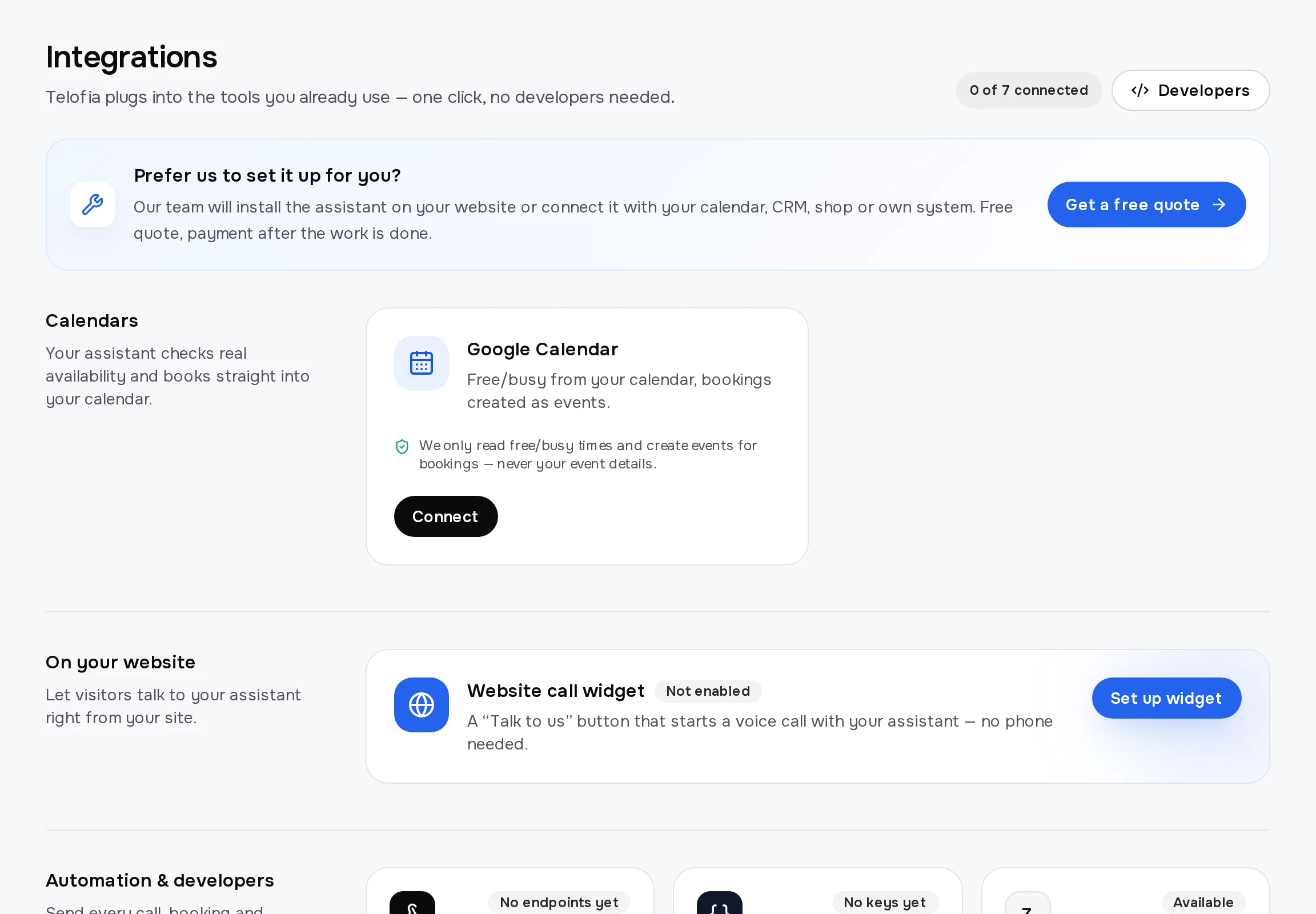
Two options help specific trades: Capacity per time for bays or chairs that take several bookings at once, and a Waitlist the assistant offers when no time suits. With Caller details you can ask for up to 8 extra items, such as car make and model.
During the 14-day trial you test the assistant in your browser; a phone number and live call transfers come with a paid plan, which starts from £35 per month on yearly billing, excluding VAT (see pricing). Every call starts with a short AI disclosure, and data is stored in the EU (Frankfurt). More detail is on how it works.
Test-call checklist: what to try before going live
Make five to ten test calls yourself before real callers reach the system, and listen back to each one.
- Book a normal appointment — does it pick the right service and offer two or three real free times?
- Ask for an exact time — say "Friday at 3pm"; it should check that time, not offer something else first.
- Ask for a time that is taken — it should say so and suggest free alternatives instead of booking over an existing appointment.
- Ask for a specific person — it should check only their diary, and offer a colleague if they're off.
- Move and cancel a booking — the calendar should change straight away, and a cancellation should need a clear yes.
- Call about a closed day — it should refuse to book and say when you reopen.
- Check the texts — confirm the SMS confirmation arrives with the right day, time and service.
- Mumble or change your mind — it should read the details back and let you correct them before booking.
- Raise an urgent or awkward request — it should transfer or take a message, not force a booking.
What should still go to a person?
Anything urgent, clinical, disputed or high-value should still reach a human. Automated booking handles routine appointments well; it should not make judgement calls for you.
- Urgent cases — dental pain or swelling, a burst pipe, a car that's unsafe to drive. Set a transfer rule so these go straight to you or a colleague.
- Clinical or technical advice — whether a treatment is suitable, what a fault might be, what a repair will cost.
- Complaints and disputes — an unhappy customer wants a person, and a quick callback from you does more than a polished answer.
- Discounts and special terms — these should be decided by you, not agreed on the phone.
- Callbacks at a set time — when a caller asks to be rung later, the time should come from them; the assistant arranges a callback at that time or creates a callback request for your team.
Write these rules down before you go live. They're what keep phone booking helpful rather than rigid.
Try automated booking on your own calls
The quickest way to see whether it suits your business is to hear it book an appointment for you. Start a free 14-day trial with 30 free minutes, add your services and connect your calendar.
Then run through the test-call checklist above. If it books your trickiest service correctly, that is a good sign it can handle the routine ones.
Frequently asked questions
Can an AI receptionist book directly into my diary, or does it only take messages?
A properly set-up AI receptionist books directly into your calendar during the call, after checking real availability and getting the caller's confirmation. Telofia books into Google Calendar or its built-in calendar, and it can also take a message when a booking isn't what the caller needs.
Can AI book appointments over the phone for a salon, clinic or dentist?
Yes, as long as your services, durations and staff calendars are set up. It can book with a named stylist or dentist, offer a colleague when someone is fully booked, and send an SMS confirmation when SMS booking confirmations are switched on (SMS allowance depends on the plan). Urgent or clinical questions should still be transferred to a person.
Can callers reschedule or cancel an appointment by phone?
Yes. The caller can move an existing appointment to another free time or cancel it after an explicit yes, and the calendar is updated straight away. The freed slot is then available to the next caller.
Does phone booking still work while my team is busy with clients or patients?
Yes. Calls are answered and booked while you're mid-appointment, under a car or after closing time. Your team sees new bookings in the calendar and gets a summary of every call by email.
Will callers know they are speaking to an AI?
Yes. Every call starts with a short AI disclosure, so callers know they are speaking to an AI assistant. Callers can still ask for a person, and you decide which calls are transferred with transfer rules on a paid plan; during the trial the assistant takes a message instead.
Try Telofia on your own calls
Set up your AI receptionist in about five minutes: 14-day trial with 30 free minutes, no card needed for the browser test.
Prefer to hear it first?
Enter your number and the assistant calls you within seconds, acting as the receptionist of your business.
Also available in: Polski, Deutsch, Español, Italiano, Português