Adding the Telofia Voice and Chat Widget to Your Website
Telofia team · · · 5 min read
Adding the Telofia voice and chat widget to your website lets visitors speak directly with your AI receptionist or text their enquiries without picking up a telephone. You can customise the styling in your dashboard, add your domain, and embed a single asynchronous script before your closing body tag. The voice-enabled web widget is included on the Office plan and above.
Step by step
Step 1: Navigate to the widget editor
Log in to your dashboard and select Integrations from the sidebar menu. Under Website call widget, click Set up widget to open the Website widget page.
Navigate to the widget editor Step 2: Add your allowed websites
Scroll to the Allowed websites section, enter your primary domain (for example, yourbusiness.co.uk), and click Add. The widget only loads on authorised domains to protect your account and minute allowance.
Step 3: Customise the appearance and greeting
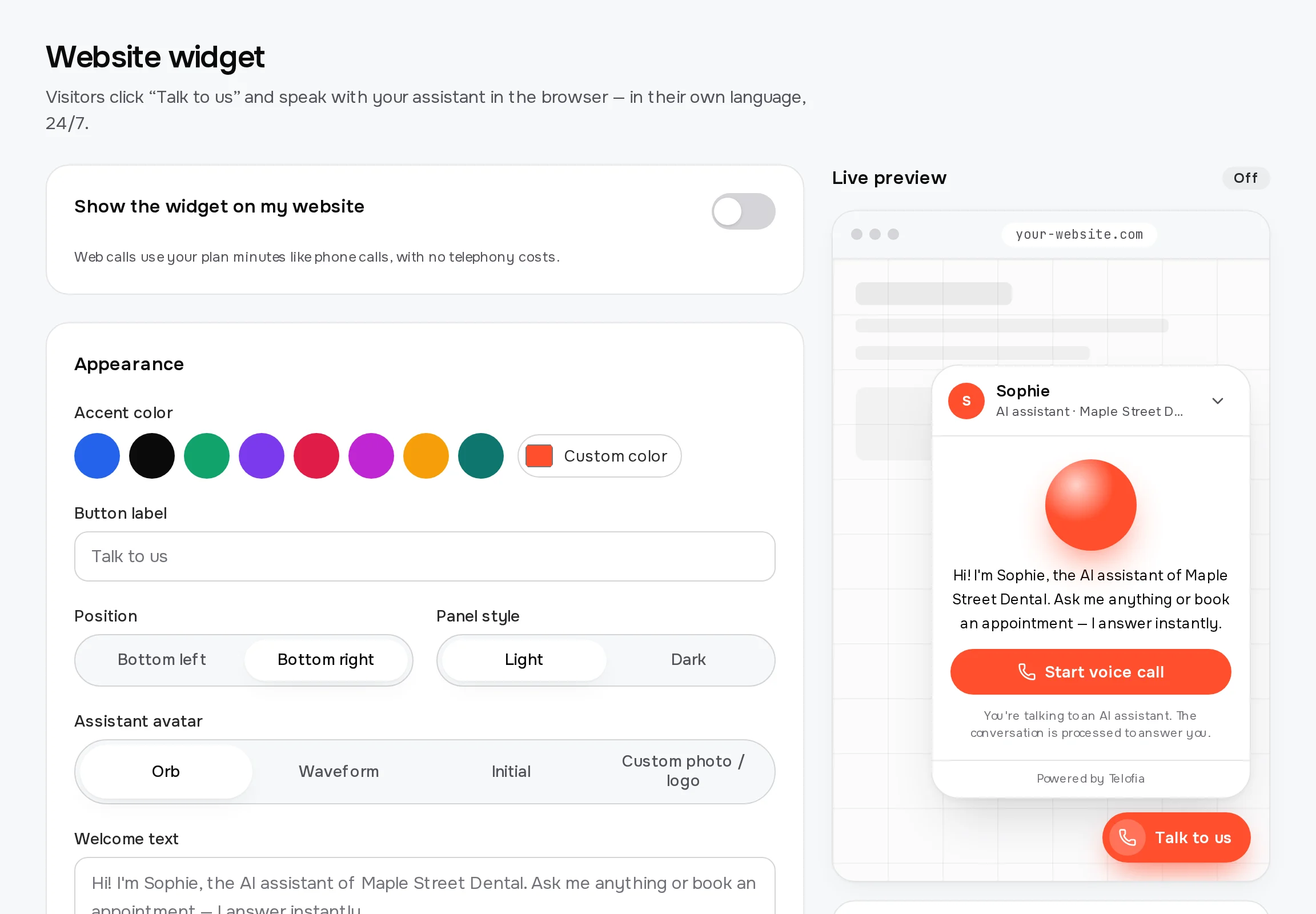
Under Appearance, select your accent colour, choose Bottom right or Bottom left position, pick your panel theme (Light or Dark), and set your avatar. Enter your greeting under Welcome text to introduce your assistant before the conversation begins.
Step 4: Enable the widget switch
Toggle the switch labelled Show the widget on my website to active. Once toggled, the widget will be ready to serve visitors as soon as the code is embedded.
Step 5: Copy the embed snippet for your platform
Go to Install on your website and select your platform tab, such as Any website, WordPress, Wix, Shopify, Webflow, Squarespace, or Google Tag Manager. Copy your unique code snippet and paste it just before the closing
</body>tag of your site.Step 6: Save and verify with live preview
Click Save widget at the bottom of the page. You can test your configuration directly on the screen in the Live preview area or by selecting Try the real widget here before visiting your live website.
What to prepare before installing the widget
Before adding the widget to your website, make sure your AI receptionist is fully configured with your business details, operating hours, and booking settings.
Ensure you have administrative access to your website's content management system or template header and footer settings so you can insert the snippet before the closing body tag.
Which plan includes the voice widget?
The voice-calling website widget is included starting on the Office plan, which costs £191 per month on yearly billing or £229 per month on monthly billing (net prices, excluding VAT).
The Office plan also includes 3,000 minutes, up to 5 simultaneous calls, 3 phone numbers, live call takeover, payment links via Stripe Connect, and premium natural language quality.
If you are on the Line plan (£35 per month yearly / £42 monthly) or the Desk plan (£64 per month yearly / £77 monthly), you can upgrade at any time in Billing & plan to unlock web voice calls.
Browser-based calls made through the widget consume your included plan minutes just like standard telephone calls, with no additional telecommunication toll fees.
Customising the look to match your brand
The widget design editor gives you full control over how the launcher and conversation modal blend with your website aesthetics.
- Accent color: Pick a preset tone or paste your exact hexadecimal brand colour to tint the launcher button and call controls.
- Position: Dock the widget in the Bottom right or Bottom left corner so it does not block cookie banners, shopping carts, or essential navigation.
- Assistant avatar: Choose between an animated Orb, a Waveform, a clean Initial, or upload your own team photo or company logo in PNG, JPG, or WebP format under 1 MB.
- Panel style: Select Light or Dark mode to ensure clear contrast and legibility across your website pages.
Troubleshooting common widget installation issues
If the widget button does not appear after saving, verify that you entered your domain in Allowed websites exactly as visitors see it, without trailing slashes.
If visitors report they cannot speak, their browser may have blocked microphone access; the widget automatically notifies users and displays a Type instead option so they can continue via chat.
When using cache plugins on platforms like WordPress or Shopify, clear your website cache after pasting the code to ensure the new script loads immediately for visitors.
Every session on the widget complies with EU data regulations, hosting processing infrastructure in Frankfurt and presenting an automatic AI disclosure at the start of interactions.
Start answering website enquiries automatically
Adding the Telofia voice and chat widget to your website helps you capture leads, answer common client queries, and book appointments around the clock without manual intervention.
Discover how our automated receptionist streamlines communication across both phone lines and web browsers by visiting how it works.
Sign up for a 14-day free trial with 30 included minutes at signup and experience how easy it is to deploy your custom AI assistant today.
Frequently asked questions
Which plan includes the Telofia voice widget?
The interactive voice widget is available on the Office plan (£191 per month billed yearly, or £229 per month billed monthly, excl. VAT) and the Network plan. Lower tiers include the phone receptionist features but require an upgrade to enable voice conversations inside the web browser.
Do widget calls use up plan minutes?
Yes, voice calls conducted through the website widget draw from your plan's included minute allowance (such as the 3,000 minutes provided on the Office plan). However, because the connection runs over the internet, no telephone carrier charges apply.
What happens if a visitor does not allow microphone access?
If a visitor declines or blocks microphone permissions in their web browser, the widget displays an informative alert and allows them to switch seamlessly to text messaging via the chat interface.
Will the Telofia widget script slow down my website?
No, the snippet loads asynchronously just before the closing body tag. It does not block page rendering or delay your site's content from loading for visitors.
Try Telofia on your own calls
Set up your AI receptionist in about five minutes: 14-day trial with 30 free minutes, no card needed for the browser test.
Prefer to hear it first?
Enter your number and the assistant calls you within seconds, acting as the receptionist of your business.
Also available in: Polski, Deutsch